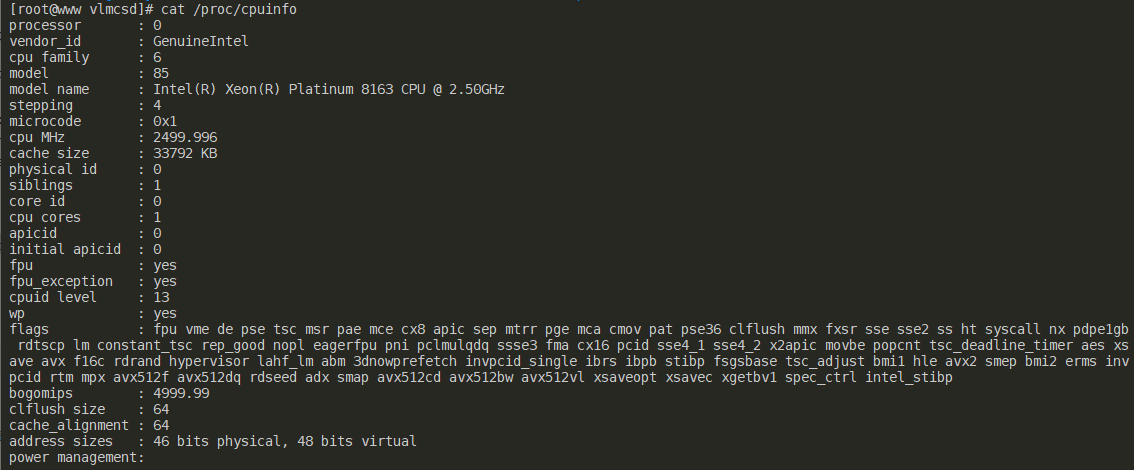
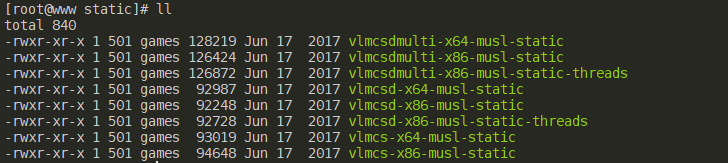
## vlmcsd 这是一个国外大神开发的项目, 目前开源在 Github 上, 大家可以去支持一下: [Wind4/vlmcsd][1] 先挑个好地方下载大神的项目, 解压 ``` wget https://github.com/Wind4/vlmcsd/releases/download/svn1111/binaries.tar.gz tar zxf binaries.tar.gz ``` vlmcsd 目录下针对不同的操作系统和架构, 给出了不同的可执行文件, 所以需要查看自己的操作系统和架构, 使用如下命令, 以小兮的主机为例, 是 Intel 的 x64 架构 ``` cat /proc/cpuinfo ``` ![系统信息][2] 接着进入对应的目录, 执行程序就可以啦, 按照我的理解, 这里带 threads 后缀的应该是多线程版本, multi 就不清楚了, 我们只用**vlmcsd-x64-musl-static**就够了 ![Snipaste_2020-05-22_11-28-55.png][3] ``` ./vlmcsd-x64-musl-static ``` 为了方便, 我们把它添加到开机自启动, 只保留我们需要的文件**vlmcsd-x64-musl-static**, 将它拷贝到 `/usr/local/bin`目录下, 其他的都可以删除了 ``` echo "/usr/local/bin/vlmcsd-x64-musl-static > /dev/null 2>&1" >> /etc/rc.local ``` 补充两个命令, 一个查看运行状态: ``` ps -ef | grep vlmcsd-x64-musl-static ``` 一个结束进程 ``` kill -9 上一步 ps 命令回显的 vlmcsd 进程 ID ``` ## vlmcsd on the docker 害, 依旧是 vlmcsd, 换用 docker 方式会更简单, 只需要两条命令, 前提是已经按照了 docker 环境, 如果没有安装, 可以移步: [Orientation and setup][4] 拉取 docker 镜像, 并启动运行 ``` docker pull mikolatero/vlmcsd docker run -d -p 1688:1688 --restart=always --name vlmcsd mikolatero/vlmcsd ``` **注意点:** 1688是 KMS 服务器的默认端口, 确保防火墙已经开放了这个端口, 不放心可以通过 telnet 命令测试一下, 以 Windows 为例, 使用 cmd 命令提示符 ``` telnet ip_addr 1688 ``` 如果端口未开放, 会显示**正在连接ip_addr...无法打开到主机的连接。 在端口 1688: 连接失败**, 这里的 ip_addr 是你的主机的 IP地址, 如果端口是开放的, 会显示一个小黑框, 只有一个光标 最后附上一些公共的KMS服务器和VL激活Key: 激活方式:确认系统版本,选择对应的Key,然后通过命令提示符或者PowerShell执行以下命令。以Windows10专业版为例,作用依次为卸载旧密钥,安装新密钥,设置激活服务器,自动联机激活。 ``` slmgr /upk slmgr /ipk W269N-WFGWX-YVC9B-4J6C9-T83GX slmgr /skms kms.03k.org slmgr /ato ``` ``` zh.us.to kms.03k.org kms.chinancce.com kms.shuax.com kms.dwhd.org kms.luody.info kms.digiboy.ir kms.lotro.cc cy2617.jios.org xykz.f3322.org kms.library.hk ``` **Windows Server 2016** | 操作系统 | KMS激活序列号 | | ------------------------------ | ----------------------------- | | Windows Server 2016 Datacenter | CB7KF-BWN84-R7R2Y-793K2-8XDDG | | Windows Server 2016 Standard | WC2BQ-8NRM3-FDDYY-2BFGV-KHKQY | | Windows Server 2016 Essentials | JCKRF-N37P4-C2D82-9YXRT-4M63B | **Windows 10** | 操作系统 | KMS激活序列号 | | --------------------------------- | ----------------------------- | | Windows 10 Professional | W269N-WFGWX-YVC9B-4J6C9-T83GX | | Windows 10 Professional N | MH37W-N47XK-V7XM9-C7227-GCQG9 | | Windows 10 Enterprise | NPPR9-FWDCX-D2C8J-H872K-2YT43 | | Windows 10 Enterprise N | DPH2V-TTNVB-4X9Q3-TJR4H-KHJW4 | | Windows 10 Education | NW6C2-QMPVW-D7KKK-3GKT6-VCFB2 | | Windows 10 Education N | 2WH4N-8QGBV-H22JP-CT43Q-MDWWJ | | Windows 10 Enterprise 2015 LTSB | WNMTR-4C88C-JK8YV-HQ7T2-76DF9 | | Windows 10 Enterprise 2015 LTSB N | 2F77B-TNFGY-69QQF-B8YKP-D69TJ | | Windows 10 Enterprise 2016 LTSB | DCPHK-NFMTC-H88MJ-PFHPY-QJ4BJ | | Windows 10 Enterprise 2016 LTSB N | QFFDN-GRT3P-VKWWX-X7T3R-8B639 | **Windows Server 2012 R2 和 Windows 8.1** | 操作系统 | KMS激活序列号 | | -------------------------------------- | ----------------------------- | | Windows 8.1 Professional | GCRJD-8NW9H-F2CDX-CCM8D-9D6T9 | | Windows 8.1 Professional N | HMCNV-VVBFX-7HMBH-CTY9B-B4FXY | | Windows 8.1 Enterprise | MHF9N-XY6XB-WVXMC-BTDCT-MKKG7 | | Windows 8.1 Enterprise N | TT4HM-HN7YT-62K67-RGRQJ-JFFXW | | Windows Server 2012 R2 Server Standard | D2N9P-3P6X9-2R39C-7RTCD-MDVJX | | Windows Server 2012 R2 Datacenter | W3GGN-FT8W3-Y4M27-J84CP-Q3VJ9 | | Windows Server 2012 R2 Essentials | KNC87-3J2TX-XB4WP-VCPJV-M4FWM | **Windows Server 2012 和 Windows 8** | 操作系统 | KMS激活序列号 | | --------------------------------------- | ----------------------------- | | Windows 8 Professional | NG4HW-VH26C-733KW-K6F98-J8CK4 | | Windows 8 Professional N | XCVCF-2NXM9-723PB-MHCB7-2RYQQ | | Windows 8 Enterprise | 32JNW-9KQ84-P47T8-D8GGY-CWCK7 | | Windows 8 Enterprise N | JMNMF-RHW7P-DMY6X-RF3DR-X2BQT | | Windows Server 2012 | BN3D2-R7TKB-3YPBD-8DRP2-27GG4 | | Windows Server 2012 N | 8N2M2-HWPGY-7PGT9-HGDD8-GVGGY | | Windows Server 2012 Single Language | 2WN2H-YGCQR-KFX6K-CD6TF-84YXQ | | Windows Server 2012 Country Specific | 4K36P-JN4VD-GDC6V-KDT89-DYFKP | | Windows Server 2012 Server Standard | XC9B7-NBPP2-83J2H-RHMBY-92BT4 | | Windows Server 2012 MultiPoint Standard | HM7DN-YVMH3-46JC3-XYTG7-CYQJJ | | Windows Server 2012 MultiPoint Premium | XNH6W-2V9GX-RGJ4K-Y8X6F-QGJ2G | | Windows Server 2012 Datacenter | 48HP8-DN98B-MYWDG-T2DCC-8W83P | **Windows 7 and Windows Server 2008 R2** | 操作系统 | KMS激活序列号 | | ------------------------------------------------ | ----------------------------- | | Windows 7 Professional | FJ82H-XT6CR-J8D7P-XQJJ2-GPDD4 | | Windows 7 Professional N | MRPKT-YTG23-K7D7T-X2JMM-QY7MG | | Windows 7 Professional E | W82YF-2Q76Y-63HXB-FGJG9-GF7QX | | Windows 7 Enterprise | 33PXH-7Y6KF-2VJC9-XBBR8-HVTHH | | Windows 7 Enterprise N | YDRBP-3D83W-TY26F-D46B2-XCKRJ | | Windows 7 Enterprise E | C29WB-22CC8-VJ326-GHFJW-H9DH4 | | Windows Server 2008 R2 Web | 6TPJF-RBVHG-WBW2R-86QPH-6RTM4 | | Windows Server 2008 R2 HPC edition | TT8MH-CG224-D3D7Q-498W2-9QCTX | | Windows Server 2008 R2 Standard | YC6KT-GKW9T-YTKYR-T4X34-R7VHC | | Windows Server 2008 R2 Enterprise | 489J6-VHDMP-X63PK-3K798-CPX3Y | | Windows Server 2008 R2 Datacenter | 74YFP-3QFB3-KQT8W-PMXWJ-7M648 | | Windows Server 2008 R2 for Itanium-based Systems | GT63C-RJFQ3-4GMB6-BRFB9-CB83V | **Windows Vista and Windows Server 2008** | 操作系统 | KMS激活序列号 | | ---------------------------------------------- | ----------------------------- | | Windows Vista Business | YFKBB-PQJJV-G996G-VWGXY-2V3X8 | | Windows Vista Business N | HMBQG-8H2RH-C77VX-27R82-VMQBT | | Windows Vista Enterprise | VKK3X-68KWM-X2YGT-QR4M6-4BWMV | | Windows Vista Enterprise N | VTC42-BM838-43QHV-84HX6-XJXKV | | Windows Web Server 2008 | WYR28-R7TFJ-3X2YQ-YCY4H-M249D | | Windows Server 2008 Standard | TM24T-X9RMF-VWXK6-X8JC9-BFGM2 | | Windows Server 2008 Standard without Hyper-V | W7VD6-7JFBR-RX26B-YKQ3Y-6FFFJ | | Windows Server 2008 Enterprise | YQGMW-MPWTJ-34KDK-48M3W-X4Q6V | | Windows Server 2008 Enterprise without Hyper-V | 39BXF-X8Q23-P2WWT-38T2F-G3FPG | | Windows Server 2008 HPC | RCTX3-KWVHP-BR6TB-RB6DM-6X7HP | | Windows Server 2008 Datacenter | 7M67G-PC374-GR742-YH8V4-TCBY3 | | Windows Server 2008 Datacenter without Hyper-V | 22XQ2-VRXRG-P8D42-K34TD-G3QQC | | Windows Server 2008 for Itanium-Based Systems | 4DWFP-JF3DJ-B7DTH-78FJB-PDRHK | [1]: https://github.com/Wind4/vlmcsd [2]: https://www.simaek.com/usr/uploads/2020/05/263323442.png [3]: https://www.simaek.com/usr/uploads/2020/05/3316529345.png [4]: https://docs.docker.com/get-started/ Loading... ## vlmcsd 这是一个国外大神开发的项目, 目前开源在 Github 上, 大家可以去支持一下: [Wind4/vlmcsd][1] 先挑个好地方下载大神的项目, 解压 ``` wget https://github.com/Wind4/vlmcsd/releases/download/svn1111/binaries.tar.gz tar zxf binaries.tar.gz ``` vlmcsd 目录下针对不同的操作系统和架构, 给出了不同的可执行文件, 所以需要查看自己的操作系统和架构, 使用如下命令, 以小兮的主机为例, 是 Intel 的 x64 架构 ``` cat /proc/cpuinfo ``` ![系统信息][2] 接着进入对应的目录, 执行程序就可以啦, 按照我的理解, 这里带 threads 后缀的应该是多线程版本, multi 就不清楚了, 我们只用**vlmcsd-x64-musl-static**就够了 ![Snipaste_2020-05-22_11-28-55.png][3] ``` ./vlmcsd-x64-musl-static ``` 为了方便, 我们把它添加到开机自启动, 只保留我们需要的文件**vlmcsd-x64-musl-static**, 将它拷贝到 `/usr/local/bin`目录下, 其他的都可以删除了 ``` echo "/usr/local/bin/vlmcsd-x64-musl-static > /dev/null 2>&1" >> /etc/rc.local ``` 补充两个命令, 一个查看运行状态: ``` ps -ef | grep vlmcsd-x64-musl-static ``` 一个结束进程 ``` kill -9 上一步 ps 命令回显的 vlmcsd 进程 ID ``` ## vlmcsd on the docker 害, 依旧是 vlmcsd, 换用 docker 方式会更简单, 只需要两条命令, 前提是已经按照了 docker 环境, 如果没有安装, 可以移步: [Orientation and setup][4] 拉取 docker 镜像, 并启动运行 ``` docker pull mikolatero/vlmcsd docker run -d -p 1688:1688 --restart=always --name vlmcsd mikolatero/vlmcsd ``` **注意点:** 1688是 KMS 服务器的默认端口, 确保防火墙已经开放了这个端口, 不放心可以通过 telnet 命令测试一下, 以 Windows 为例, 使用 cmd 命令提示符 ``` telnet ip_addr 1688 ``` 如果端口未开放, 会显示**正在连接ip_addr...无法打开到主机的连接。 在端口 1688: 连接失败**, 这里的 ip_addr 是你的主机的 IP地址, 如果端口是开放的, 会显示一个小黑框, 只有一个光标 最后附上一些公共的KMS服务器和VL激活Key: 激活方式:确认系统版本,选择对应的Key,然后通过命令提示符或者PowerShell执行以下命令。以Windows10专业版为例,作用依次为卸载旧密钥,安装新密钥,设置激活服务器,自动联机激活。 ``` slmgr /upk slmgr /ipk W269N-WFGWX-YVC9B-4J6C9-T83GX slmgr /skms kms.03k.org slmgr /ato ``` ``` zh.us.to kms.03k.org kms.chinancce.com kms.shuax.com kms.dwhd.org kms.luody.info kms.digiboy.ir kms.lotro.cc cy2617.jios.org xykz.f3322.org kms.library.hk ``` **Windows Server 2016** | 操作系统 | KMS激活序列号 | | ------------------------------ | ----------------------------- | | Windows Server 2016 Datacenter | CB7KF-BWN84-R7R2Y-793K2-8XDDG | | Windows Server 2016 Standard | WC2BQ-8NRM3-FDDYY-2BFGV-KHKQY | | Windows Server 2016 Essentials | JCKRF-N37P4-C2D82-9YXRT-4M63B | **Windows 10** | 操作系统 | KMS激活序列号 | | --------------------------------- | ----------------------------- | | Windows 10 Professional | W269N-WFGWX-YVC9B-4J6C9-T83GX | | Windows 10 Professional N | MH37W-N47XK-V7XM9-C7227-GCQG9 | | Windows 10 Enterprise | NPPR9-FWDCX-D2C8J-H872K-2YT43 | | Windows 10 Enterprise N | DPH2V-TTNVB-4X9Q3-TJR4H-KHJW4 | | Windows 10 Education | NW6C2-QMPVW-D7KKK-3GKT6-VCFB2 | | Windows 10 Education N | 2WH4N-8QGBV-H22JP-CT43Q-MDWWJ | | Windows 10 Enterprise 2015 LTSB | WNMTR-4C88C-JK8YV-HQ7T2-76DF9 | | Windows 10 Enterprise 2015 LTSB N | 2F77B-TNFGY-69QQF-B8YKP-D69TJ | | Windows 10 Enterprise 2016 LTSB | DCPHK-NFMTC-H88MJ-PFHPY-QJ4BJ | | Windows 10 Enterprise 2016 LTSB N | QFFDN-GRT3P-VKWWX-X7T3R-8B639 | **Windows Server 2012 R2 和 Windows 8.1** | 操作系统 | KMS激活序列号 | | -------------------------------------- | ----------------------------- | | Windows 8.1 Professional | GCRJD-8NW9H-F2CDX-CCM8D-9D6T9 | | Windows 8.1 Professional N | HMCNV-VVBFX-7HMBH-CTY9B-B4FXY | | Windows 8.1 Enterprise | MHF9N-XY6XB-WVXMC-BTDCT-MKKG7 | | Windows 8.1 Enterprise N | TT4HM-HN7YT-62K67-RGRQJ-JFFXW | | Windows Server 2012 R2 Server Standard | D2N9P-3P6X9-2R39C-7RTCD-MDVJX | | Windows Server 2012 R2 Datacenter | W3GGN-FT8W3-Y4M27-J84CP-Q3VJ9 | | Windows Server 2012 R2 Essentials | KNC87-3J2TX-XB4WP-VCPJV-M4FWM | **Windows Server 2012 和 Windows 8** | 操作系统 | KMS激活序列号 | | --------------------------------------- | ----------------------------- | | Windows 8 Professional | NG4HW-VH26C-733KW-K6F98-J8CK4 | | Windows 8 Professional N | XCVCF-2NXM9-723PB-MHCB7-2RYQQ | | Windows 8 Enterprise | 32JNW-9KQ84-P47T8-D8GGY-CWCK7 | | Windows 8 Enterprise N | JMNMF-RHW7P-DMY6X-RF3DR-X2BQT | | Windows Server 2012 | BN3D2-R7TKB-3YPBD-8DRP2-27GG4 | | Windows Server 2012 N | 8N2M2-HWPGY-7PGT9-HGDD8-GVGGY | | Windows Server 2012 Single Language | 2WN2H-YGCQR-KFX6K-CD6TF-84YXQ | | Windows Server 2012 Country Specific | 4K36P-JN4VD-GDC6V-KDT89-DYFKP | | Windows Server 2012 Server Standard | XC9B7-NBPP2-83J2H-RHMBY-92BT4 | | Windows Server 2012 MultiPoint Standard | HM7DN-YVMH3-46JC3-XYTG7-CYQJJ | | Windows Server 2012 MultiPoint Premium | XNH6W-2V9GX-RGJ4K-Y8X6F-QGJ2G | | Windows Server 2012 Datacenter | 48HP8-DN98B-MYWDG-T2DCC-8W83P | **Windows 7 and Windows Server 2008 R2** | 操作系统 | KMS激活序列号 | | ------------------------------------------------ | ----------------------------- | | Windows 7 Professional | FJ82H-XT6CR-J8D7P-XQJJ2-GPDD4 | | Windows 7 Professional N | MRPKT-YTG23-K7D7T-X2JMM-QY7MG | | Windows 7 Professional E | W82YF-2Q76Y-63HXB-FGJG9-GF7QX | | Windows 7 Enterprise | 33PXH-7Y6KF-2VJC9-XBBR8-HVTHH | | Windows 7 Enterprise N | YDRBP-3D83W-TY26F-D46B2-XCKRJ | | Windows 7 Enterprise E | C29WB-22CC8-VJ326-GHFJW-H9DH4 | | Windows Server 2008 R2 Web | 6TPJF-RBVHG-WBW2R-86QPH-6RTM4 | | Windows Server 2008 R2 HPC edition | TT8MH-CG224-D3D7Q-498W2-9QCTX | | Windows Server 2008 R2 Standard | YC6KT-GKW9T-YTKYR-T4X34-R7VHC | | Windows Server 2008 R2 Enterprise | 489J6-VHDMP-X63PK-3K798-CPX3Y | | Windows Server 2008 R2 Datacenter | 74YFP-3QFB3-KQT8W-PMXWJ-7M648 | | Windows Server 2008 R2 for Itanium-based Systems | GT63C-RJFQ3-4GMB6-BRFB9-CB83V | **Windows Vista and Windows Server 2008** | 操作系统 | KMS激活序列号 | | ---------------------------------------------- | ----------------------------- | | Windows Vista Business | YFKBB-PQJJV-G996G-VWGXY-2V3X8 | | Windows Vista Business N | HMBQG-8H2RH-C77VX-27R82-VMQBT | | Windows Vista Enterprise | VKK3X-68KWM-X2YGT-QR4M6-4BWMV | | Windows Vista Enterprise N | VTC42-BM838-43QHV-84HX6-XJXKV | | Windows Web Server 2008 | WYR28-R7TFJ-3X2YQ-YCY4H-M249D | | Windows Server 2008 Standard | TM24T-X9RMF-VWXK6-X8JC9-BFGM2 | | Windows Server 2008 Standard without Hyper-V | W7VD6-7JFBR-RX26B-YKQ3Y-6FFFJ | | Windows Server 2008 Enterprise | YQGMW-MPWTJ-34KDK-48M3W-X4Q6V | | Windows Server 2008 Enterprise without Hyper-V | 39BXF-X8Q23-P2WWT-38T2F-G3FPG | | Windows Server 2008 HPC | RCTX3-KWVHP-BR6TB-RB6DM-6X7HP | | Windows Server 2008 Datacenter | 7M67G-PC374-GR742-YH8V4-TCBY3 | | Windows Server 2008 Datacenter without Hyper-V | 22XQ2-VRXRG-P8D42-K34TD-G3QQC | | Windows Server 2008 for Itanium-Based Systems | 4DWFP-JF3DJ-B7DTH-78FJB-PDRHK | [1]: https://github.com/Wind4/vlmcsd [2]: https://www.simaek.com/usr/uploads/2020/05/263323442.png [3]: https://www.simaek.com/usr/uploads/2020/05/3316529345.png [4]: https://docs.docker.com/get-started/ 最后修改:2022 年 07 月 15 日 © 允许规范转载 打赏 赞赏作者 支付宝微信 赞 如果觉得我的文章对你有用,请随意赞赏